شرح كيفية جدولة إيقاف التشغيل / إعادة التشغيل في حواسيب ويندوز بدون برنامج ؟

  • بادئ الموضوع بادئ الموضوع theba
  • تاريخ البدء تاريخ البدء
  • المشاهدات المشاهدات 356 مشاهدة

theba

عضو مشاغب
الكاتب
إنضم
25 يوليو 2023
المشاركات
9,679
الحلول
92
مستوى التفاعل
8,086
النقاط
0
العمر
53
الإقامة
المشاغب
الجنس
كيفية طريقة جدولة ايقاف تشغيل الحاسب بدون برنامج ؟
حاسبك ينزّل ملفات ولا تستطيع الانتظار حتى ينتهي..تريد النوم؟
حاسبك يعمل وسينتهي بعد ساعات...لكن حينها ستكون خارج المنزل؟
لا تريد لطفلك أن يستخدم الحاسب أكثر من الساعات المقررة؟

إليك طريقة تجدول بها إيقاف / إعادة تشغيل الحاسوب:
1: في لوحة المفاتيح أضغط على زر النافذة (WinKey) والحرف R


2: ستظهر لك نافذة التشغيل (RUN):


3: أدخل العبارة:
إيقاف التشغيل (Shutdown)= Shutdown –s -t
إعادة التشغيل (Restart)= Shutdown /r -t
بعد الحرف T أضف عدد الثواني المطلوبة
ثم أنقر على OK
نموذج= Shutdown -s -t 600 (إيقاف التشغيل بعد 10 دقائق)

4: إذا أدخلتها بشكل صحيح ستشاهد هذه النافذة


لإلغاء العملية (Cancel Operation)= Shutdown /a
بعد أن تدخل العبارة ستظهر هذه النافذة

تريد تسريع العملية وعدم التكرار:
أنشئ اختصار للعملية (Shortcut)
1: على سطح المكتب أنقر على الزر الأيمن للماوس ثم New ثم Shortcut

2: أدخل عبارتك.... مثلا: Shutdown -s -t 600 ثم أنقر على (Next)


3: اختر الاسم المطلوب للاختصار ثم أنقر على (Finish)


4: سيظهر الاختصار على سطح المكتب، متى أردت الجدولة أنقر على هذا الاختصار.
 

شكرا

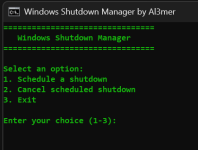
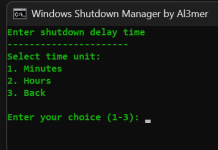
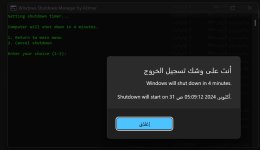
أعجبتني الفكرة وتم تحويلها لدردشة مع نافذة cmd


لقطة شاشة 2024-10-31 050345.png


لقطة شاشة 2024-10-31 050356.png


shut.jpg


كود:
@echo off
title Windows Shutdown Manager by Al3mer
color 0A

:menu
cls
echo ================================
echo    Windows Shutdown Manager
echo ================================
echo.
echo Select an option:
echo 1. Schedule a shutdown
echo 2. Cancel scheduled shutdown
echo 3. Exit
echo.

:inputChoice
set choice=
set /p choice=Enter your choice (1-3):
if "%choice%"=="" goto inputChoice
if "%choice%"=="1" goto shutdown_menu
if "%choice%"=="2" goto cancel_shutdown
if "%choice%"=="3" goto exit_script
echo Invalid choice. Please enter 1, 2, or 3.
timeout /t 2 >nul
goto menu

:shutdown_menu
cls
echo Choose shutdown type:
echo 1. Schedule shutdown with timer
echo 2. Immediate shutdown
echo 3. Back to main menu
echo.
set action=
set /p action=Enter your choice (1-3):
if "%action%"=="3" goto menu
if "%action%"=="1" goto timer_shutdown
if "%action%"=="2" goto immediate_shutdown
echo Invalid choice. Please try again.
timeout /t 2 >nul
goto shutdown_menu

:timer_shutdown
cls
echo Enter shutdown delay time
echo ----------------------
echo Select time unit:
echo 1. Minutes
echo 2. Hours
echo 3. Back
echo.
set unit=
set /p unit=Enter your choice (1-3):
if "%unit%"=="3" goto shutdown_menu
if "%unit%"=="1" goto set_minutes
if "%unit%"=="2" goto set_hours
echo Invalid choice. Please try again.
timeout /t 2 >nul
goto timer_shutdown

:set_minutes
cls
echo Enter minutes (1-1440):
set /p time_value=
if "%time_value%"=="" goto set_minutes
set /a minutes=time_value 2>nul
if errorlevel 1 (
    echo Please enter a valid number.
    timeout /t 2 >nul
    goto set_minutes
)
if %minutes% LEQ 0 (
    echo Please enter a positive number.
    timeout /t 2 >nul
    goto set_minutes
)
if %minutes% GTR 1440 (
    echo Maximum delay is 1440 minutes (24 hours^).
    timeout /t 2 >nul
    goto set_minutes
)
goto execute_shutdown

:set_hours
cls
echo Enter hours (1-24):
set /p time_value=
if "%time_value%"=="" goto set_hours
set /a hours=time_value 2>nul
if errorlevel 1 (
    echo Please enter a valid number.
    timeout /t 2 >nul
    goto set_hours
)
if %hours% LEQ 0 (
    echo Please enter a positive number.
    timeout /t 2 >nul
    goto set_hours
)
if %hours% GTR 24 (
    echo Maximum delay is 24 hours.
    timeout /t 2 >nul
    goto set_hours
)
set /a minutes=hours * 60
goto execute_shutdown

:execute_shutdown
cls
set /a seconds=minutes * 60
echo Setting shutdown timer...
echo.
shutdown -s -t %seconds%
if errorlevel 1 (
    echo Error setting shutdown timer. Please run as administrator.
    pause
    goto menu
)
if %minutes% GEQ 60 (
    set /a display_hours=minutes / 60
    set /a display_minutes=minutes %% 60
    echo Computer will shut down in %display_hours% hours and %display_minutes% minutes.
) else (
    echo Computer will shut down in %minutes% minutes.
)
echo.
echo 1. Return to main menu
echo 2. Cancel shutdown
echo.
set /p final_choice=Enter your choice (1-2):
if "%final_choice%"=="2" goto cancel_shutdown
goto menu

:immediate_shutdown
cls
echo WARNING: Computer will shut down immediately!
echo.
echo 1. Confirm shutdown
echo 2. Cancel and return to menu
echo.
set /p confirm=Enter your choice (1-2):
if "%confirm%"=="1" (
    shutdown -s -t 0
) else (
    goto menu
)

:cancel_shutdown
cls
shutdown /a
if errorlevel 1 (
    echo No shutdown currently scheduled.
) else (
    echo Scheduled shutdown has been canceled.
)
timeout /t 2 >nul
goto menu

:exit_script
cls
echo Goodbye!
timeout /t 2 >nul
exit /b
 

المرفقات

التعديل الأخير:

شكرا

أعجبتني الفكرة وتم تحويلها لدردشة مع نافذة cmd


مشاهدة المرفق 31988


مشاهدة المرفق 31989


مشاهدة المرفق 31990


كود:
@echo off
title Windows Shutdown Manager by Al3mer
color 0A

:menu
cls
echo ================================
echo    Windows Shutdown Manager
echo ================================
echo.
echo Select an option:
echo 1. Schedule a shutdown
echo 2. Cancel scheduled shutdown
echo 3. Exit
echo.

:inputChoice
set choice=
set /p choice=Enter your choice (1-3):
if "%choice%"=="" goto inputChoice
if "%choice%"=="1" goto shutdown_menu
if "%choice%"=="2" goto cancel_shutdown
if "%choice%"=="3" goto exit_script
echo Invalid choice. Please enter 1, 2, or 3.
timeout /t 2 >nul
goto menu

:shutdown_menu
cls
echo Choose shutdown type:
echo 1. Schedule shutdown with timer
echo 2. Immediate shutdown
echo 3. Back to main menu
echo.
set action=
set /p action=Enter your choice (1-3):
if "%action%"=="3" goto menu
if "%action%"=="1" goto timer_shutdown
if "%action%"=="2" goto immediate_shutdown
echo Invalid choice. Please try again.
timeout /t 2 >nul
goto shutdown_menu

:timer_shutdown
cls
echo Enter shutdown delay time
echo ----------------------
echo Select time unit:
echo 1. Minutes
echo 2. Hours
echo 3. Back
echo.
set unit=
set /p unit=Enter your choice (1-3):
if "%unit%"=="3" goto shutdown_menu
if "%unit%"=="1" goto set_minutes
if "%unit%"=="2" goto set_hours
echo Invalid choice. Please try again.
timeout /t 2 >nul
goto timer_shutdown

:set_minutes
cls
echo Enter minutes (1-1440):
set /p time_value=
if "%time_value%"=="" goto set_minutes
set /a minutes=time_value 2>nul
if errorlevel 1 (
    echo Please enter a valid number.
    timeout /t 2 >nul
    goto set_minutes
)
if %minutes% LEQ 0 (
    echo Please enter a positive number.
    timeout /t 2 >nul
    goto set_minutes
)
if %minutes% GTR 1440 (
    echo Maximum delay is 1440 minutes (24 hours^).
    timeout /t 2 >nul
    goto set_minutes
)
goto execute_shutdown

:set_hours
cls
echo Enter hours (1-24):
set /p time_value=
if "%time_value%"=="" goto set_hours
set /a hours=time_value 2>nul
if errorlevel 1 (
    echo Please enter a valid number.
    timeout /t 2 >nul
    goto set_hours
)
if %hours% LEQ 0 (
    echo Please enter a positive number.
    timeout /t 2 >nul
    goto set_hours
)
if %hours% GTR 24 (
    echo Maximum delay is 24 hours.
    timeout /t 2 >nul
    goto set_hours
)
set /a minutes=hours * 60
goto execute_shutdown

:execute_shutdown
cls
set /a seconds=minutes * 60
echo Setting shutdown timer...
echo.
shutdown -s -t %seconds%
if errorlevel 1 (
    echo Error setting shutdown timer. Please run as administrator.
    pause
    goto menu
)
if %minutes% GEQ 60 (
    set /a display_hours=minutes / 60
    set /a display_minutes=minutes %% 60
    echo Computer will shut down in %display_hours% hours and %display_minutes% minutes.
) else (
    echo Computer will shut down in %minutes% minutes.
)
echo.
echo 1. Return to main menu
echo 2. Cancel shutdown
echo.
set /p final_choice=Enter your choice (1-2):
if "%final_choice%"=="2" goto cancel_shutdown
goto menu

:immediate_shutdown
cls
echo WARNING: Computer will shut down immediately!
echo.
echo 1. Confirm shutdown
echo 2. Cancel and return to menu
echo.
set /p confirm=Enter your choice (1-2):
if "%confirm%"=="1" (
    shutdown -s -t 0
) else (
    goto menu
)

:cancel_shutdown
cls
shutdown /a
if errorlevel 1 (
    echo No shutdown currently scheduled.
) else (
    echo Scheduled shutdown has been canceled.
)
timeout /t 2 >nul
goto menu

:exit_script
cls
echo Goodbye!
timeout /t 2 >nul
exit /b


شكرا لك
 
جزاك الله خيرا 🌹
 
  • Like
التفاعلات: theba
مع الشکر لحضورکم
----------------
 
عودة
أعلى أسفل